Ask a Question
Search BRUIN Support for help articles.
How do I review my financial aid award?
Viewing Financial Aid Awards
1 - Click on the FINANCIAL tab.

2 - Item 1 will show estimated cost of attendance calculated by your selection of campus, housing preference, textbooks, as well as additional fees.
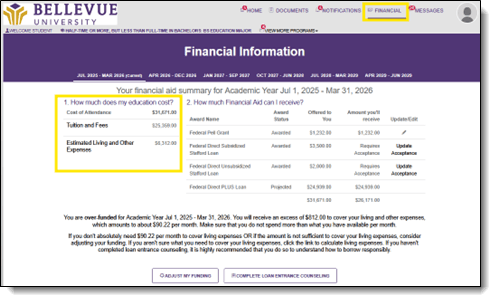
3 - Item 2 will show financial aid awards. These awards can include federal loans and grants, state and institutional grants, merit scholarships, and federal work study if applicable. It will also indicate if you will owe anything additional beyond what is included in their financial aid package.
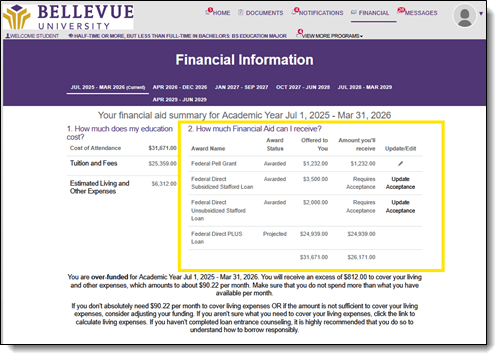
• Award information is estimated based on currently available data. These amounts, dates and acceptance criteria may change in the future based on updated data. You will be notified of any changes via email.
• Grants and scholarships can be awarded based on need and/or academic merit. They do not need to be repaid but are subject to specific renewal and eligibility criteria from year to year.
• If you received a merit-based scholarship, it is your obligation to review, understand, and meet the renewal and eligibility criteria standards associated with the merit-based scholarship awards.
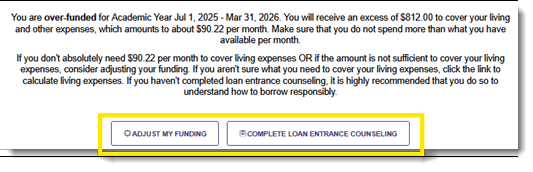
4 - The buttons in the center of the screen will allow students to accept/adjust/reject items in your financial aid package, calculate their living expenses, and complete loan entrance counseling with the US Department of Education.
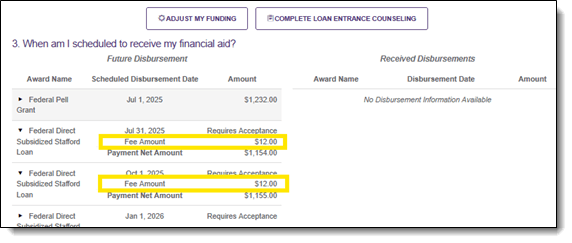
5 - Item 3 will show the disbursement schedule of funds. Disbursement dates are traditionally the beginning of the term.
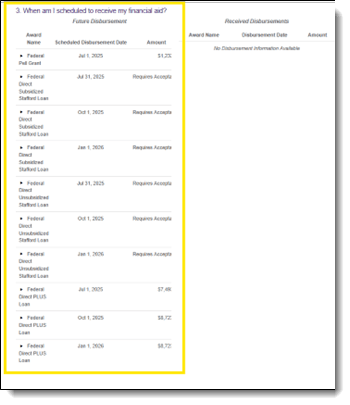
6 - To view net amounts and loan fees associated with each fund, click the ► next to the fund in Item 3.
End of Procedure
To provide feedback on this article, contact Bruin Support Services!